Computer Security Tips: Protect Yourself and Your Data from Cyber Threats
In today's digital age, computer security is more important than ever. With the rise of cyber threats and online attacks, it's essential to take proactive steps to protect yourself and your data from hackers, phishing scams, malware, and other online threats. In this article, we'll share 25 essential computer security tips to help you stay safe online.
Software Updates and Patching
One of the most critical computer security tips is to keep your software up to date. Regularly update your operating system, browser, and other software applications to ensure you have the latest security patches and features. This will help prevent exploitation of known vulnerabilities and keep your computer secure.
- Enable automatic updates for your operating system and software applications.
- Regularly scan for updates and install them promptly.
- Use a reliable antivirus software to detect and remove malware.
Password Management
Strong passwords and password management are crucial to protecting your computer and data from unauthorized access. Use a password manager to generate and store unique, complex passwords for each account.
- Use a password manager to generate and store unique passwords.
- Avoid using the same password for multiple accounts.
- Enable two-factor authentication (2FA) whenever possible.
Network Security
Secure your wireless network by using a strong password and enabling WPA2 encryption. Avoid using public Wi-Fi networks or accessing sensitive information on public computers.
- Use a secure password and WPA2 encryption for your wireless network.
- Avoid using public Wi-Fi networks or accessing sensitive information on public computers.
- Use a VPN (Virtual Private Network) to encrypt your internet traffic when using public networks.
Device Security
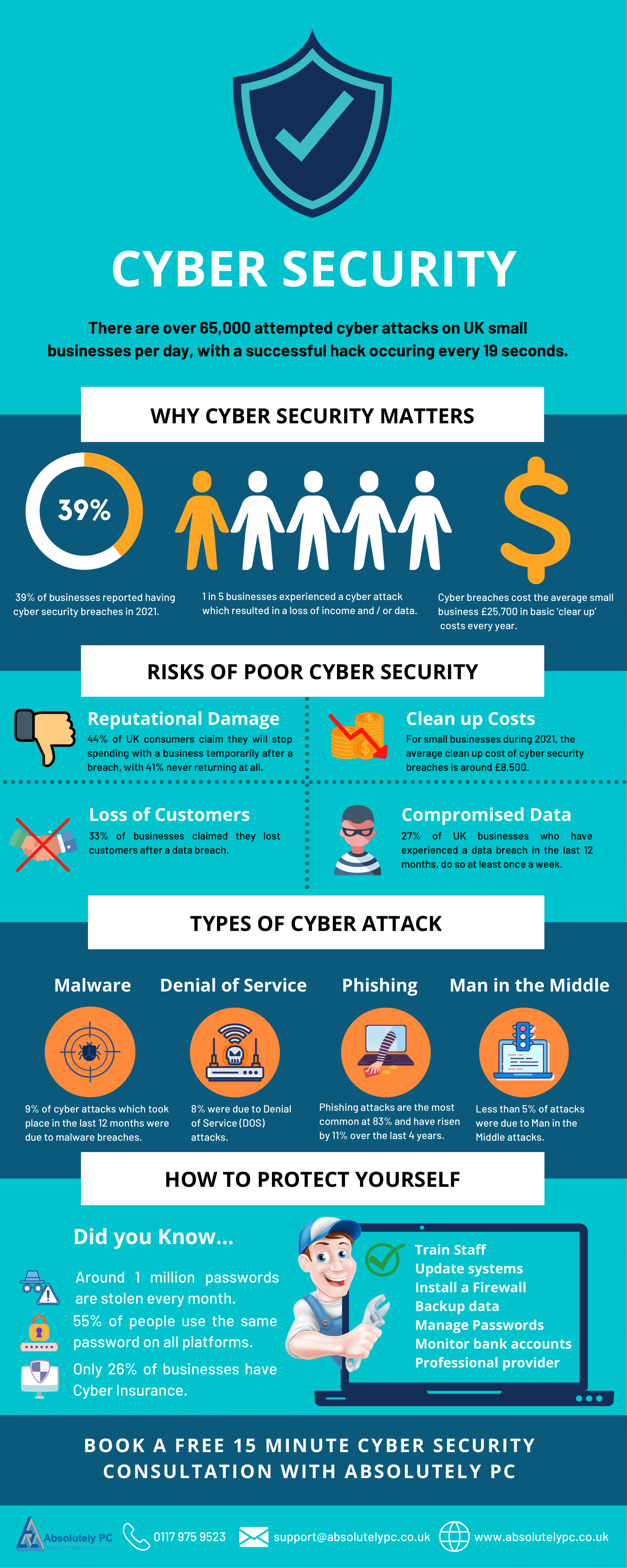
Keep your computer and other devices up to date, and regularly scan for malware and viruses. Use a reputable antivirus software and firewall to protect your devices from cyber threats.
- Regularly scan for malware and viruses using a reputable antivirus software.
- Use a firewall to block unauthorized access to your devices.
- Avoid downloading and installing software from untrusted sources.
Online Safety
Be cautious when interacting with online services and avoid suspicious emails, links, or attachments. Keep your social media accounts private and avoid sharing sensitive information online.
- Be cautious when interacting with online services and avoid suspicious emails, links, or attachments.
- Keep your social media accounts private and avoid sharing sensitive information online.
- Use strong passwords and 2FA to protect your online accounts.
Additional Computer Security Tips
Additionally, here are some more computer security tips to help you stay safe online:
- Use strong antivirus software and regularly scan for malware and viruses.
- Keep your computer and other devices backed up regularly to prevent data loss.
- Use a reputable VPN to encrypt your internet traffic when using public networks.
- Avoid using pirated software or copyright materials.
- Use strong passwords and 2FA to protect your online accounts.
- Regularly update your operating system and software applications to ensure you have the latest security patches.
- Use a password manager to generate and store unique passwords.
- Enable two-factor authentication (2FA) whenever possible.
Conclusion
Computer security is a shared responsibility between individuals, organizations, and governments. By following these 25 essential computer security tips, you can protect yourself and your data from cyber threats and stay safe online. Remember, security is not just a necessity, but also a habit. Stay vigilant, stay informed, and stay secure online.