Secure Router Wireless Settings: A Comprehensive Guide
Are you concerned about the security of your home network? Do you want to ensure that your router is set up to protect your devices and personal data? In this article, we'll show you how to configure your router's wireless settings to create a secure and reliable network.
Understanding the Importance of Secure Router Settings
Modern routers are a vital component of any home network, providing access to the internet and connecting multiple devices at the same time. However, an unsecured router can be a target for hackers and cybercriminals, who can easily gain access to your network and compromise your devices and personal data. To prevent this from happening, it's essential to set up your router with secure wireless settings.
Step 1: Change the Default Administrator Password
The first step to securing your router is to change the default administrator password. Most routers come with preset passwords that can be easily guessed by hackers. Change the password to a strong and unique one to prevent unauthorized access to your router's settings.
Step 2: Enable WPA3 Encryption
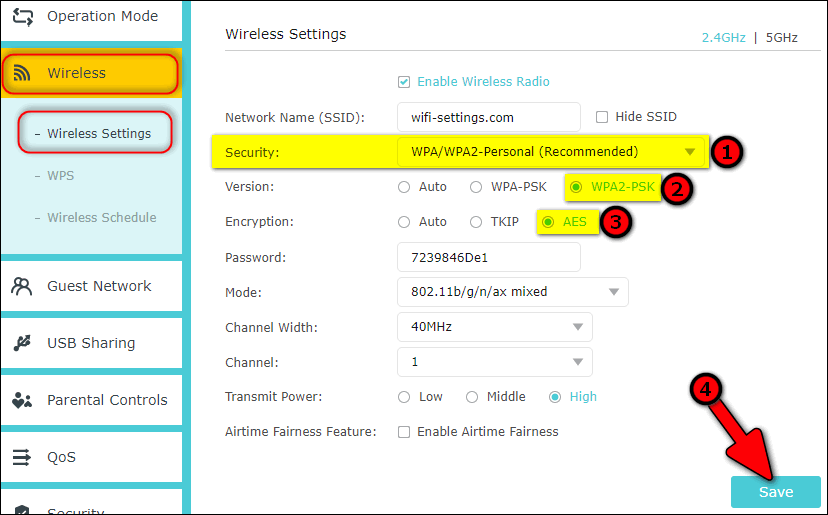
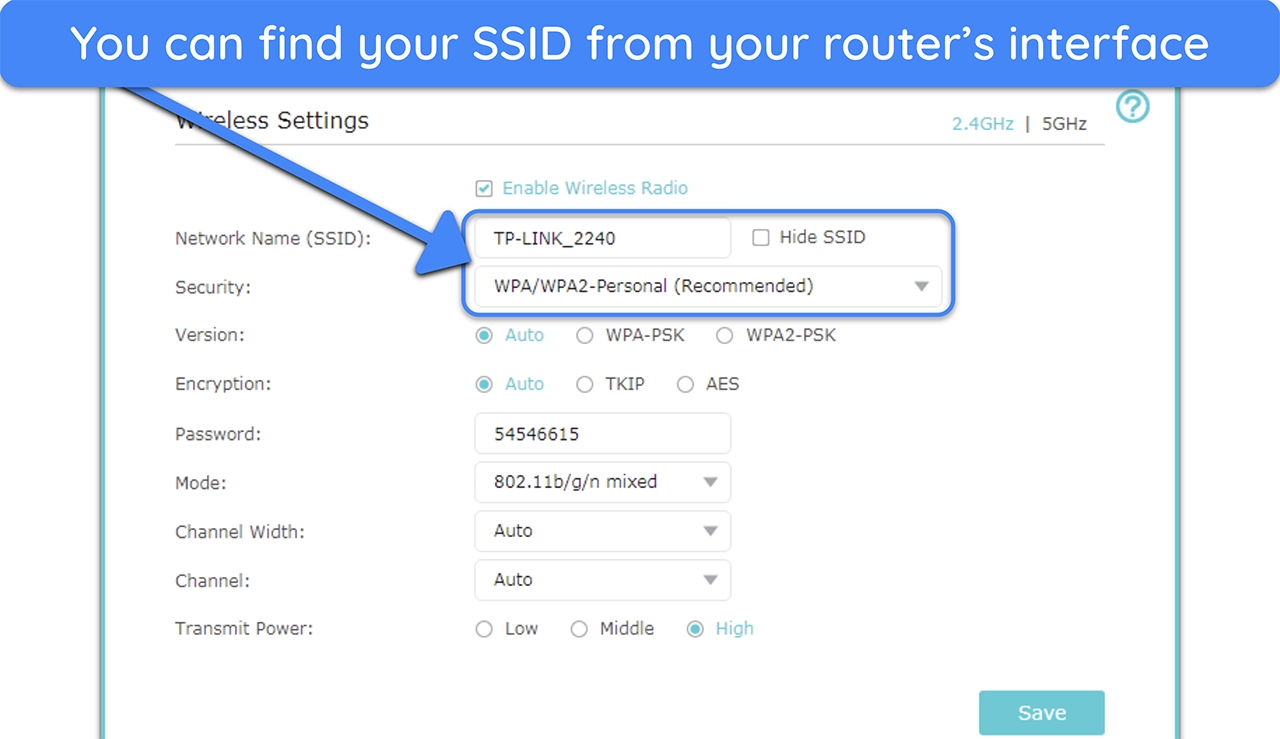
WPA3 (Wi-Fi Protected Access 3) is the latest security protocol designed to safeguard your Wi-Fi traffic. Enable WPA3 encryption on your router to ensure that your data is protected from hackers and cybercriminals. This will also ensure that your devices are connected to a secure network.
Step 3: Set Up a Guest Network
A guest network is a separate network that allows visitors to access the internet without having access to your main network. This is an excellent way to keep your main network secure while still allowing guests to use the internet. Enable the guest network feature on your router and set up a separate SSID (network name) and password for it.
Step 4: Configure the Wireless Channel and Band
The wireless channel and band can affect the performance and security of your network. Configure the wireless channel to the least congested one in your area, and choose the band that best suits your needs (2.4GHz or 5GHz). You can also enable Quality of Service (QoS) settings to prioritize traffic on your network.

Step 5: Disable Remote Access
Most routers come with a web interface that allows you to configure settings remotely. However, this feature can be a security risk if not used properly. Disable remote access on your router to prevent hackers from accessing your settings and compromising your network.
Step 6: Enable MAC Address Filtering
MAC (Media Access Control) address filtering is a feature that allows you to restrict access to your network based on the MAC address of devices. Enable MAC address filtering on your router to ensure that only authorized devices can access your network.
Step 7: Regularly Update Your Router's Firmware
Router firmware is the software that runs on your router, and it's essential to keep it up to date to ensure that your router remains secure. Regularly update your router's firmware to patch any security vulnerabilities and improve performance.
Conclusion
Securing your router's wireless settings is a crucial step in protecting your home network and personal data. By following these steps, you can ensure that your router is set up to provide a secure and reliable network for all your devices. Remember to regularly update your router's firmware and change the default administrator password to maintain the security of your network.
Additional Tips
- Regularly check for firmware updates to ensure that your router remains secure.
- Change the default administrator password to a strong and unique one.
- Enable WPA3 encryption to safeguard your Wi-Fi traffic.
- Set up a guest network to keep your main network secure while allowing visitors to access the internet.
- Configure the wireless channel and band to improve performance and security.
- Disable remote access to prevent hackers from accessing your settings.
- Enable MAC address filtering to restrict access to your network based on the MAC address of devices.

![[Wireless] How to make my router more secure? - ASUS](https://assets.esecurityplanet.com/uploads/2011/02/wifi-security.jpg "[Wireless] How to make my router more secure? - ASUS")




![[Wireless Router] How do I enter my ASUS router's setting page using ...](https://blog.meraki-go.com/content/uploads/2022/10/AM-220107-Meraki-Infographics-Wireless-EDIT-1024x619.png "[Wireless Router] How do I enter my ASUS router's setting page using ...")

.png "5 Essential Steps for Wireless Canon TS6420 Printer Setup")