Securing Business Wi-Fi Network: Tips and Best Practices
Securing a business Wi-Fi network requires a multi-faceted approach. It involves changing default settings, setting up firewalls, implementing network segmentation, using authentication and authorization, and monitoring and updating the network. By following these tips, you can significantly reduce the risk of cyber attacks and protect your organization's sensitive data.
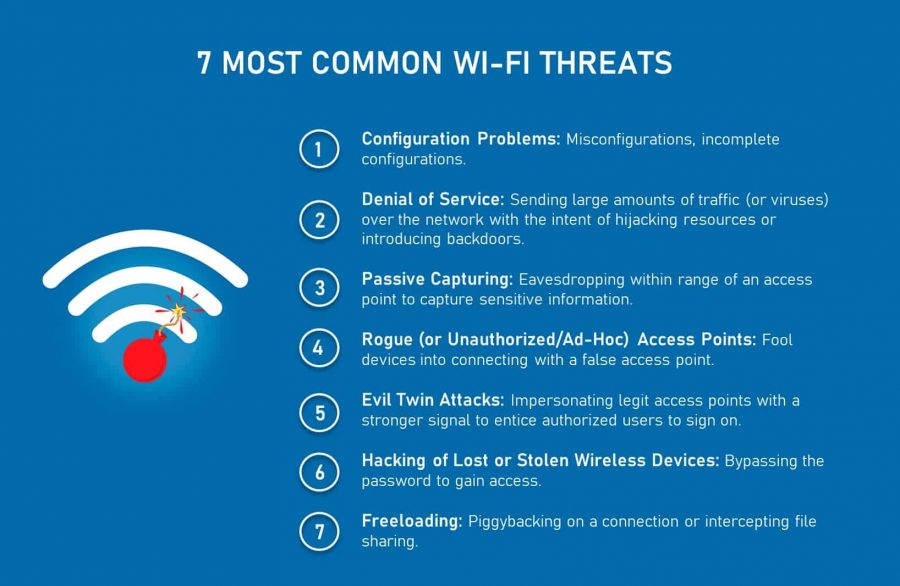
Understanding the Risks
A wireless network is an open door for hackers, and a poorly secured Wi-Fi network is an open door for them. With many devices connected to the network, the possibilities for a cyber attack are endless. Therefore, it is crucial to secure your business Wi-Fi network with the latest security protocols.
Changing Default Settings
The first and foremost step in securing your business Wi-Fi network is to change default settings. Changing the default SSID, password, and router IP address can make it difficult for hackers to gain access to your network. Moreover, updating the firmware on your router can fix security vulnerabilities and patches.
Setting Up Firewalls
Setting up a firewall is an essential step in securing your business Wi-Fi network. Firewalls block unauthorized access to your network and prevent malicious traffic from entering your system. You can either use a hardware firewall or a software firewall to protect your network.
Implementing Network Segmentation
Network segmentation is a crucial step in securing your business Wi-Fi network. It involves dividing your network into smaller segments or sub-networks, each with its own firewall and access controls. This helps to prevent lateral movement in case of a cyber attack and reduces the damage caused by a breach.

Using Authentication and Authorization
Authentication and authorization are two fundamental concepts in network security. They involve verifying the identity of users and granting them access to specific resources on your network. By implementing a robust authentication and authorization system, you can ensure that only authorized users have access to your network and sensitive data.
Monitoring and Updating Your Network
Regular monitoring and updating of your network is crucial to detect and prevent cyber attacks. By monitoring your network for suspicious activity and updating your network regularly, you can prevent attackers from exploiting vulnerabilities and stay ahead of the threats.
Best Practices for Securing Business Wi-Fi Network
Securing your business Wi-Fi network requires a combination of technical and non-technical steps. Here are some of the best practices for securing your business Wi-Fi network:
- Change the default SSID, password, and router IP address
- Set up a firewall and implement network segmentation
- Use authentication and authorization
- Regularly monitor and update your network
- Use strong encryption protocols like WPA3
- Use a guest Wi-Fi network for visitors
- Use a VPN for remote access
Conclusion
Securing your business Wi-Fi network is crucial to protect your organization's sensitive data and prevent cyber attacks. By following the tips and best practices outlined above, you can significantly reduce the risk of cyber attacks and ensure the security and integrity of your network.